Why your AI 3D model looks broken, and usually isn't
The short answer. A freshly generated 3D model will often load as thousands of separate pieces and render covered in dark specks. That is almost never damage. It is how the file format stores the surface, and one standard step collapses it back to a single solid. Measured across 25 real models: median 3,483 separate bodies before, 1 after.
The rest of this page is what that means when you actually import the file, with the screenshots.
The thing nobody tells you: more polygons is not more detail
Here is the same object twice in Roblox Studio. The one behind is the raw generated file at 500,000 triangles. The one in front is a processed version at 17,998 triangles, about 96 percent smaller.
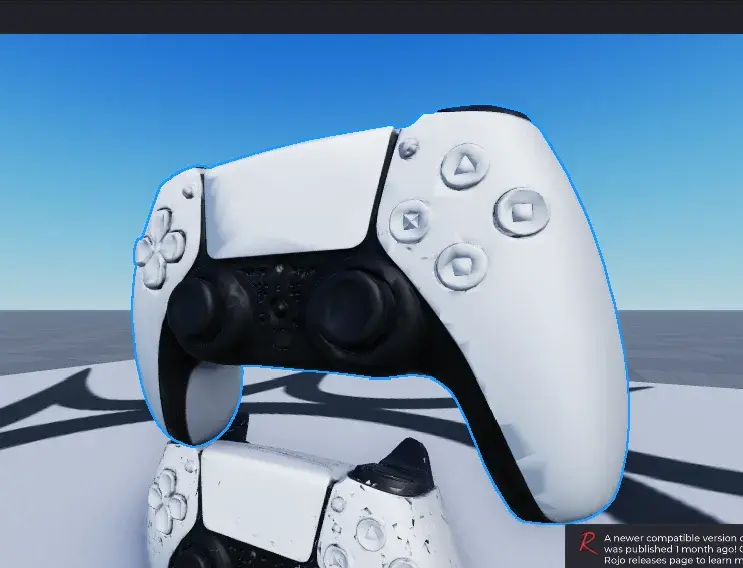
The 28-times-smaller file is the one that does not look broken.
That is the opposite of what a spec sheet implies. Here is the raw file on its own, so the specks are unmistakable:
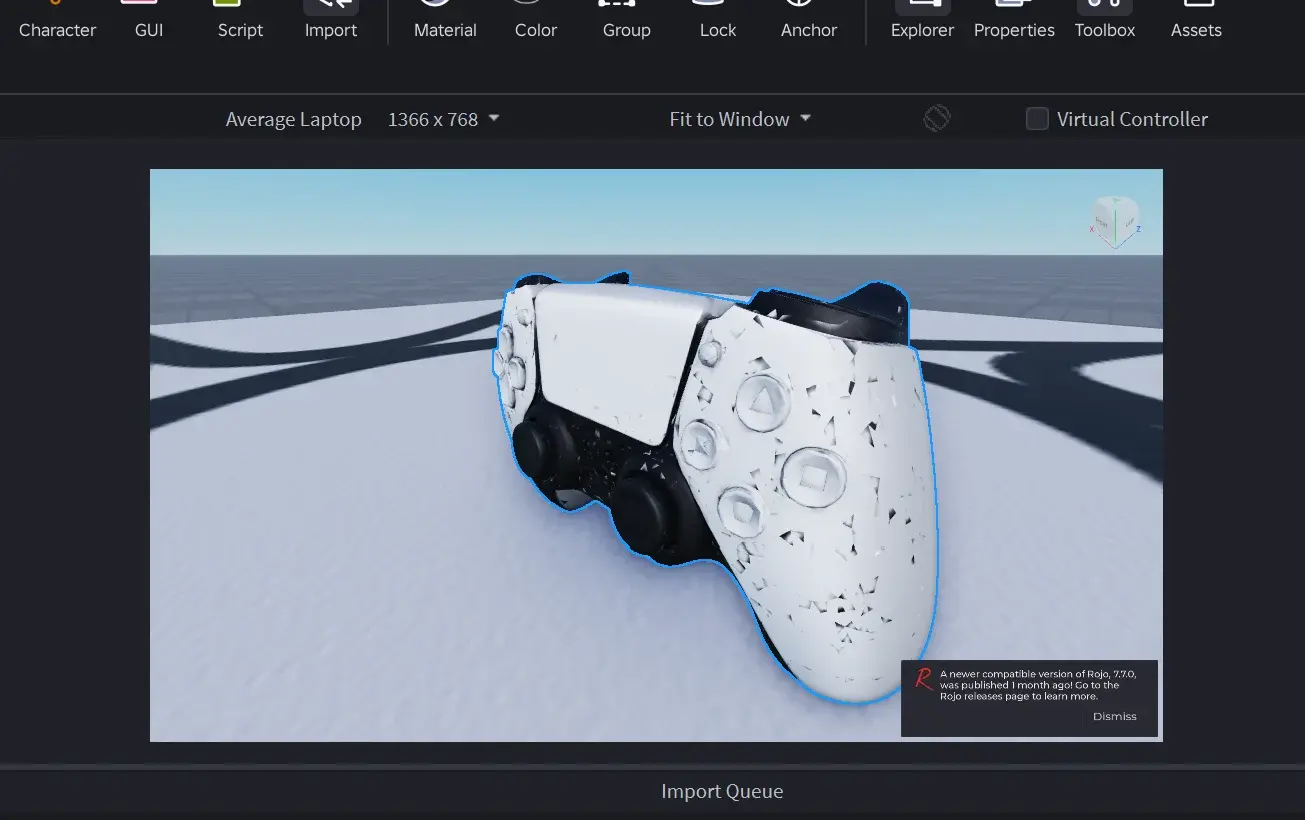
Roblox renders single-sided, which means every hole and every flipped face shows up as a dark fleck. So the specks are not a rendering bug and they are not the decimation. They are the raw geometry, made visible.
And it is not one lucky model. A second object, same treatment, same result:
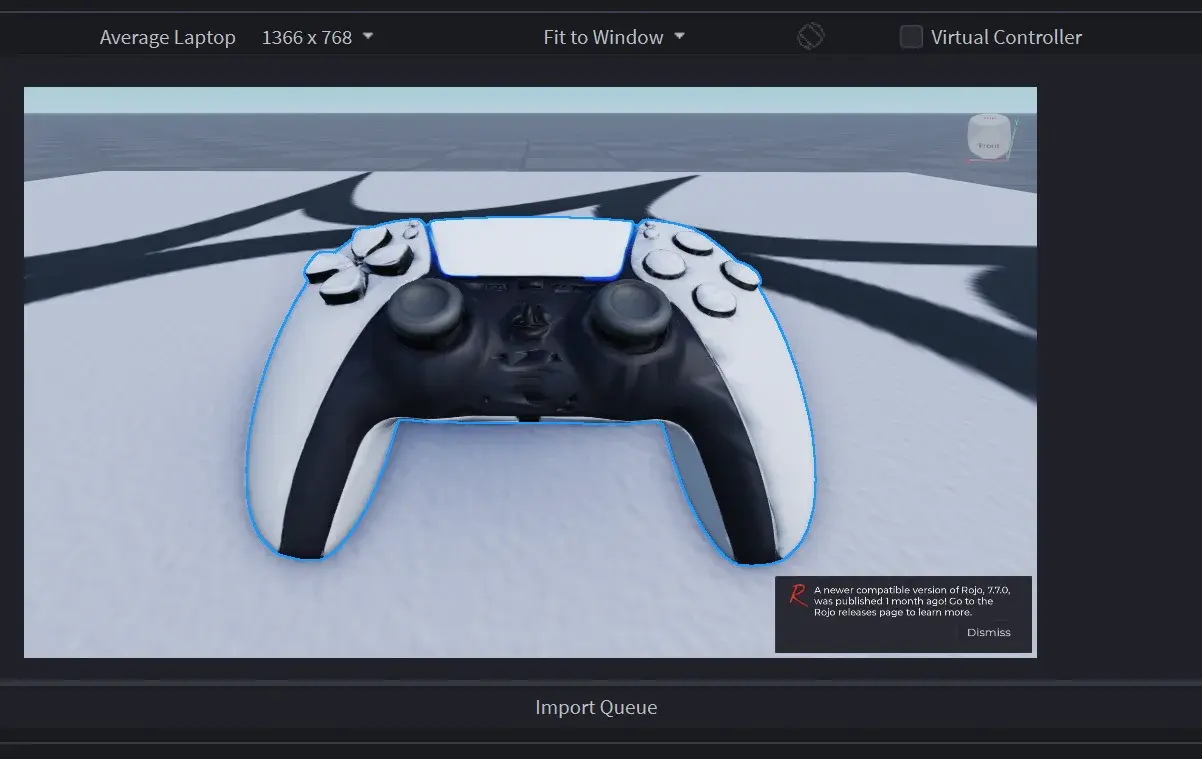
Eight of eight imported this way, and none of the processed files showed the speckling. The models cut hardest came out best, which is the detail that settles the argument: if the reduction were causing the softness, the 96-percent group would be the ugly one, and it is the clean one.
So what is actually wrong with the raw file?
Two things, and both are ordinary.
1. The surface is stored as separate pieces. I measured 25 real generated models with trimesh. Loaded raw, every single one read as non-watertight, with a median of 3,483 separate bodies and one at 40,862. That number sounds catastrophic and is not. A 3D file splits vertices wherever the texture map or the shading has a seam, so one continuous surface is stored as many fragments that happen to sit in the same place.
After one standard step, merging those duplicate vertices back together:
| Raw | After one weld | |
|---|---|---|
| Watertight | 0 of 25 | 18 of 25 |
| Printable solid | 0 of 25 | 18 of 25 |
| Median separate bodies | 3,483 | 1 |
Seventy-two percent were a printable solid after a single operation. The remaining 7 landed between 37 and 91 bodies and need real hole repair.
2. The edges genuinely are open, until they are welded. The raw model in the screenshots measured 88,180 boundary edges, an edge belonging to only one face instead of two. That count is exactly what the dark specks are. Weld first and most of them close.
The practical version: if a generated model looks like swiss cheese in your engine, try merging vertices before you throw it away. In Blender that is Mesh, then Merge, then By Distance.
What this means if you are importing to Roblox
Three things worth knowing before you spend an evening on it.
- Roblox will not refuse a 500,000-triangle mesh. Its own dialog says the asset uploads at full quality and gets "decimated down to 20,000 triangles when rendered." So the import works. It just does its own reduction, on a mesh full of open edges, and tears it further.
- Roblox cannot read WebP textures. If your file carries them, Studio reports "Could not read the texture file", every slot shows "No file provided", and the Import button greys out. The file is refused outright, and it is a texture problem rather than a geometry problem.
- Scale arrives wrong by default. 3D files of this kind carry no real-world units, so a model lands at whatever the generator normalised to. One games controller imported at 1.07 by 0.69 by 0.44 studs, roughly one stud across. Unless something sets a size for you, expect to resize.
What Meshcraft does with all of this
I built the product around the three problems above rather than around the generation step, because the generation step is the part everyone has already solved.
- Every model comes with a game-ready file, welded and reduced to about 18,000 triangles, which is the clean one in the screenshots above.
- Textures are converted to PNG, so Roblox can actually read them.
- Paid plans also get a print-ready STL, welded to a single solid and laid flat, checked by a slicer's own verdict rather than a file-format validator, because a structurally valid STL and a printable one are not the same thing.
- Every model arrives at a usable size. The game-ready file lands at 4 studs on its longest axis, which is Roblox's own sense of a prop, and the print-ready STL at 100 mm, which fits every common build plate. No resizing before you can look at it.
Frequently asked questions
Why does my AI 3D model look full of holes?
Because a raw AI mesh arrives as thousands of separate pieces rather than one solid. It is a structure problem, not a quality problem, and one standard step collapses it.
Will the game-ready file import into Roblox?
Yes. It is exported as GLB at 4 studs on the longest axis, with textures Roblox can read. The original file may not import, which is the reason both exist.
What size will my 3D print be?
The print-ready STL is scaled to 100 mm on its longest axis, so it prints at that size without rescaling.